 element30
TODO Highlighter marks the keywords you care about inline as you code, then gathers every one across your workspace into a sidebar panel grouped by keyword. Click any entry to jump straight to it.
In-editor highlighting
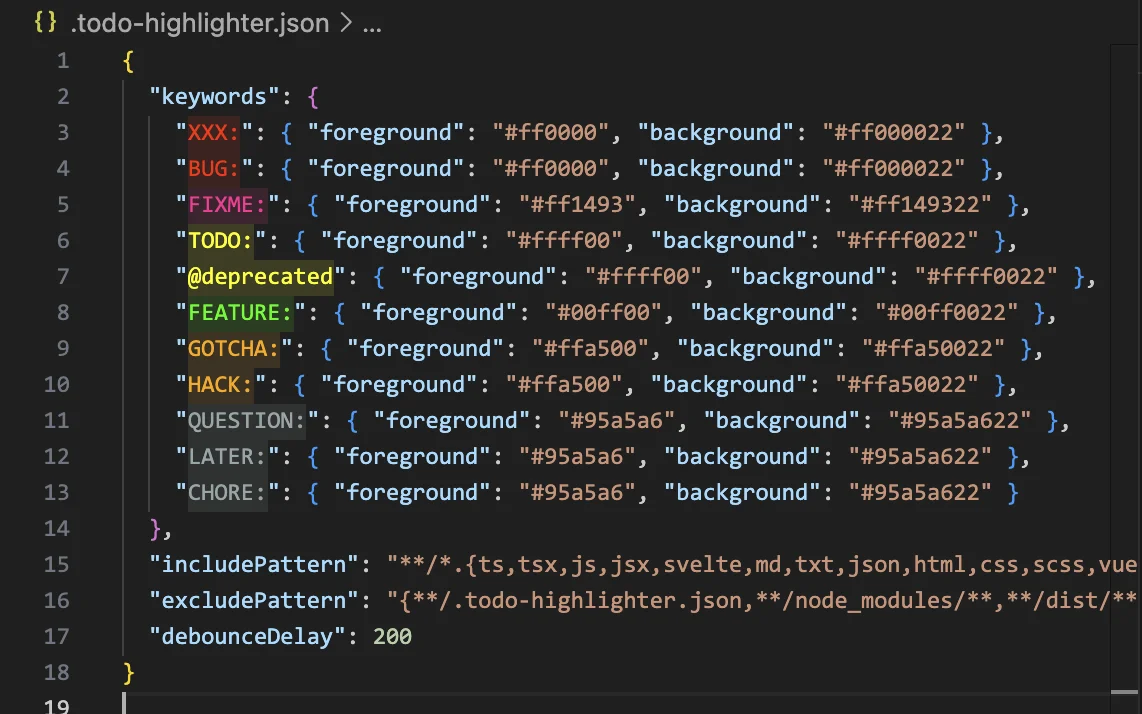
Highlight your keywords inline with per-keyword foreground and background colors.
Workspace-wide panel
A sidebar lists every TODO across your workspace, grouped by keyword type.
Click to navigate
Jump from any sidebar entry straight to its exact spot in the source.
Define your own keywords
TODO, FIXME, and HACK out of the box, plus any keyword and colors you add.
Hierarchical config
Nested config files merge so a monorepo shares roots and overrides per package.
Include/exclude globs
Control exactly which files get scanned with glob patterns.
Theme-aware panel
The panel adapts automatically to your active VS Code color theme.
Line-wrap toggle
Wrap long TODO lines and add breathing room, toggled right from the panel.
Ready to try TODO Highlighter?
A VS Code extension that highlights TODO, FIXME, HACK, and other keywords in your code with a sidebar panel to navigate them.
VS Code Marketplace